

Business Brain

Intelevate Business BrainOn-site or in the cloud

Give every employee a faster way to find answers and prepare everyday work.

Intelevate Business Brain turns your company documents, procedures, pricing and experience into one organised workspace your team can consult from an authorised browser.

Find informationPrepare workOrganise knowledge

Business Brain demonstration

brain.kyma.local Example workspace · fictional business information
Try an example

Eleni K. asked in Operations

What is our process when a customer reports an air-conditioning fault?

AnswerBased on 3 approved sourcesInternal

Follow the fault-call procedure:

  1. Log the call with the unit model, location and symptoms. Ask for a photo of the indoor unit label. [1]
  2. Check the contract. Contract customers are offered a visit within 24 hours; everyone else gets the next free slot. [1]
  3. If the unit is leaking or tripping the power, ask the customer to switch it off at the isolator. [1]
  4. Assign a technician trained on that system. VRF and ducted systems go to a senior technician. [2]
  5. After the visit, record the diagnosis and parts used before closing the job. [1]

Check before promising a weekend visit. The handbook says 24 hours, but the 2026 contract terms allow 48 hours at weekends. [1] [3]

Save to OperationsExportShare with team
Suggested next action

Ask Operations to align the weekend response time in the handbook with the 2026 contract terms.

Flag to Operations

Eleni K. asked in Quotes and Proposals

Prepare a quotation for an annual maintenance contract based on our standard pricing.Aster Accountants, Limassol · 6 wall-mounted split units

Prepared draftBased on 3 approved sourcesDraft · not sent
Quotation Q-2026-044 · Aster AccountantsValid 30 days
Draft quotation lines
Annual maintenance, wall-mounted split2 visits a year · 6 units × €85 [1]€510.00
Priority response within 24 hoursContract add-on [1]€120.00
Condensate drain treatmentIncluded in the annual plan€0.00
Subtotal€630.00
VAT 19%€119.70
Total per year€749.70

Parts and refrigerant are charged separately, as in our standard terms. [2] Layout and wording follow a recent office contract. [3]

Unit models are not on file. The price assumes wall-mounted splits. Ducted units are priced differently. [1]

Edit draftExport PDFSave to Quotes
Suggested next action

Check the draft, then send it from your own email. Nothing goes to the customer automatically.

Open in Quotes

Eleni K. asked in Operations

Turn this technician’s voice note into a customer-ready job summary.

0:48 · Andreas P. · 14:12
Prepared draftVoice note, job record and templateDraft · for review

Voice note, transcribed“…meeting room unit, drain was blocked again, cleared it, flushed the tray. Filter was pretty bad, cleaned it. Pressures look fine. Outdoor unit is right up against the wall, might be worth moving. About an hour, one pack of drain tablets.”

Organised as a job summary

Aster Accountants · meeting room unit · J-4471

Work done
Cleared a blocked condensate drain, flushed the drain tray and cleaned the indoor filter.
Checks
Refrigerant pressures within the normal range.
Advice
The outdoor unit sits very close to the wall, which can restrict airflow. We recommend assessing a new position at the next visit.
Time · parts
1 hour on site · 1 pack of drain treatment tablets

No serial number in the voice note. Add it from the job record before this goes to the customer. [2]

Edit draftTranslate to GreekSave to job
Suggested next action

Once approved, attach the summary to J-4471 so it goes out with the invoice.

Add to job record

Eleni K. asked in Management · 08:00

Summarise today’s bookings, unfinished jobs and outstanding quotations.

AnswerBased on 3 exports from this morningInternal

Tuesday briefing

  • 11 visits booked across 4 technicians. Andreas and Maria are both in Paphos after 14:00, so one van could cover both. [1]
  • 3 jobs unfinished. J-4459 is waiting for a compressor; the supplier expects Thursday. J-4462 needs a return visit to confirm a leak repair. [2]
  • 5 quotations open, worth €8,420 in total. Q-2026-031 for Seaview Hotel (€3,900) has had no reply for 9 days. [3]

Worth doing this morning

  1. Put the two Paphos visits on one van and free the second technician for Limassol. [1]
  2. Book the return visit for J-4462 before the customer calls to ask. [2]

Two bookings have no address. They were taken by phone and are not included in the Paphos route. [1]

Share with teamExportSave
Suggested next action

Draft a polite follow-up for Q-2026-031 for the sales team to check and send.

Draft follow-up

Illustrative demonstration · fictional business, not live customer dataChoose an example to see the answer, sources and next step change

What it does

Three everyday jobs, done properly.

Business Brain is not a general chatbot with your logo on it. It is set up for three kinds of work, using only the information your business has approved.

01Find

Employees get answers from your own documents, with the sources shown.

  • Find a policy or procedure
  • Check a service or a price
  • Locate previous work
  • Compare products or suppliers
  • Find instructions without searching through folders
02Prepare

Repetitive work arrives as a draft, ready for an employee to check.

  • Quotations
  • Customer replies
  • Job summaries and reports
  • Internal instructions
  • Drafts in more than one language
03Organise

New documents, notes and voice recordings end up in the right place.

  • Summarise new documents
  • Turn voice notes into organised job records
  • Group information by department or subject
  • Surface duplicate, conflicting or outdated information
  • Keep useful operational knowledge

Built around actual work

We configure the actions your team repeats every week, in your own wording.

  • Prepare a quotation
  • Draft a customer response
  • Summarise a job
  • Compare supplier offers
  • Create a staff briefing
  • Translate approved content
  • Explain a company procedure
  • Turn a voice note into a report
One shared business memory

Knowledge stops being scattered across folders, old PDFs and people’s heads.

Price lists sit in one folder, procedures in another, and the real answer is often in a WhatsApp thread or with the colleague who has been there longest. Business Brain brings the approved parts together, so everyone consults the same information.

What you already have

  • Price lists
  • Procedures
  • Previous quotations
  • Manuals
  • Supplier documents
  • Voice notes

Business Brain

Approved company information, organised into workspaces and kept current.

  • Company HandbookEveryone
  • Services and PricingSales
  • OperationsTechnicians
  • SuppliersPurchasing

What your team gets

  • Searchable answerswith sources
  • Prepared draftsfor review
  • Organised knowledgeby subject
  • Employee workspacesby role

Before: shared drives · old PDFs · WhatsApp threads · one colleague’s memoryAfter: one place to ask

Cloud or On-Site

The same Business Brain, delivered two ways.

Choose based on how your team works and whether you want the platform at your premises. Neither version is the right answer for everyone.

How your team reaches itCloud

  • Office
  • Home
  • Out on a job

Hosted workspacemanaged by Intelevate

Company knowledgeWorkspacesAccounts
  • Lower initial cost
  • Faster setup
  • Easy remote access
  • Easier scaling
  • Hosted and managed

Business Brain CloudFor smaller teams, several locations and a lower upfront cost.

Best fit
Teams that work across sites or from home, and businesses that want to start without installing hardware.
Access
Employees sign in from an authorised browser, at the office or elsewhere, each with their own account.
Setup
Faster to launch. We prepare your information and configure a hosted workspace, with nothing to install at your premises.
Operating model
Hosted and managed by Intelevate for a setup fee plus a monthly service. Adding people or workspaces later is straightforward.

How your team reaches itOn-Site

Your premises

  • Reception
  • Office
  • Workshop

Business Brain appliancebrain.yourcompany.local

Company knowledgeWorkspacesAccounts
  • Email
  • WhatsApp
  • Cloud storage
  • Secure remote access
  • Installed at your premises
  • Core platform runs locally
  • Browser access
  • Individual accounts
  • Maintained by Intelevate

Business Brain On-SiteFor established, document-heavy workplaces that want the core platform at their premises.

Best fit
Businesses with several departments, plenty of documents and a team that relies on the same information all week.
Access
Authorised employees open a simple local address, such as brain.yourcompany.local, in the browser they already use. Everyone has their own account.
Setup
We install and configure the appliance, prepare your information, set up the workspaces and train your team on site.
Operating model
Core company knowledge is stored and processed on the appliance, and core functions keep working on your local network. Services you connect, such as email or WhatsApp, still need the internet. Maintained by Intelevate under managed care.

Not sure which version fits? We will recommend the simpler option when an appliance is unnecessary.

What you are paying for

The appliance is only one part of the system.

The value is in turning your company’s information into something your employees can actually use.

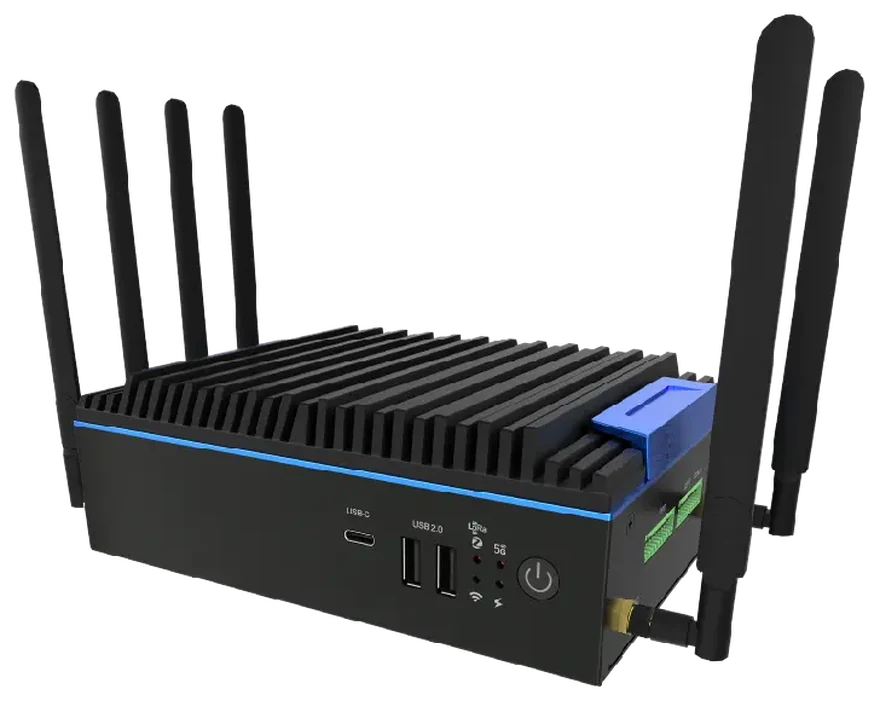
The Business Brain On-Site appliance: a compact, fanless black unit that Intelevate installs at your premises
On-Site appliance
Part 06 of 10

The hardware that runs Business Brain at your premises. On its own it is an empty computer; the other nine parts are what make it useful. Cloud customers get a hosted workspace instead.

  1. Business discoveryHow work really flows, who asks what, and where the time goes.
  2. Information mappingWhere useful knowledge lives today: folders, PDFs, inboxes and people.
  3. Document preparationCurrent versions chosen, duplicates flagged, gaps pointed out.
  4. Workspace configurationWorkspaces by department or role, each with the right information.
  5. Initial actions and templatesQuotations, replies, reports and briefings set up in your wording.
  6. Appliance or cloud setupThe appliance prepared for your premises, or a hosted workspace.
  7. Employee accountsIndividual sign-ins, organised by department or role.
  8. InstallationTested on your own network, browsers and devices before launch.
  9. Team trainingShort, practical sessions with the people who will use it.
  10. Ongoing maintenance and improvementUpdates, new documents and better actions, based on real use.
Packages

Two ways to start.

Both include the work of preparing your information and setting Business Brain up around your team. The difference is where it runs and how it is looked after.

Cloud

Business Brain Cloud

A hosted workspace for smaller teams, remote access and a lower upfront cost.

from€990setup+ €149/monthVAT included. The one-off setup covers preparing your information, configuring the workspace and onboarding your team. The monthly service covers hosting and managed updates. Larger teams or larger volumes of information are quoted individually.

  • Hosted workspace
  • Company knowledge setup
  • Employee accounts
  • Initial templates
  • Onboarding
  • Managed updates
On-Site

Business Brain On-Site

An installed and configured system at your premises, for established, document-heavy workplaces.

from€2,990+ managed careVAT included. The starting price for an installed and configured business system, not for the hardware alone. The final figure depends on team size, the amount of information and the actions you need.

  • AI appliance
  • Local company workspace
  • Company knowledge setup
  • Employee accounts
  • Initial templates
  • On-site installation
  • Team training
  • Managed care
Is it right for you

Business Brain pays off where knowledge is shared and work repeats.

It changes how a team works, so we would rather be clear about where it fits before you spend anything.

A good fit if

  • Several employees repeatedly search for the same information
  • The business has useful documents, procedures, price lists or previous work
  • Employees regularly prepare similar quotations, replies or reports
  • Important knowledge is concentrated in a few people
  • The platform would be used throughout the working week

Probably not needed if

  • Only one person wants occasional general AI assistance
  • The company has very little reusable information
  • A simple cloud subscription already solves the problem
  • The company is not ready to organise its source material

Where On-Site usually makes sense

Established businesses where many people rely on the same information. A café or a one-person business rarely needs an appliance.

  • Automotive and larger service businesses
  • Property management
  • Hotels
  • Wholesalers and distributors
  • Construction and maintenance
  • Engineering and architecture
  • Accountancy and administrative offices
  • Multi-location businesses
How it is delivered

Discover, organise, install, improve.

The same four steps for Cloud and On-Site. Most of the work happens before anyone asks their first question.

  1. 01

    Discover

    Understand how the business works and where useful knowledge lives.

  2. 02

    Organise

    Prepare approved documents, workspaces and initial actions.

  3. 03

    Install

    Configure the cloud workspace or install the appliance, and train the team.

  4. 04

    Improve

    Review real usage, update knowledge and refine the workflows.

Before you ask

Straight answers about Business Brain.

The product

Does Business Brain replace ChatGPT?

Not really, and it is not meant to. General assistants are good at general questions. Business Brain is set up around your approved company information, your workspaces and your everyday tasks, and it shows the sources behind each answer. Some teams keep a general assistant for everything else.

Does it work without the internet?

With On-Site, core company knowledge and the core supported functions run on the appliance, so everyday searching and drafting can carry on over your local network if your connection drops. Anything that relies on an outside service, such as email, WhatsApp, cloud storage or remote access, still needs the internet. Cloud needs an internet connection.

What documents can it work with?

Everyday business files such as PDFs, Word and Excel documents, text files and notes, plus voice recordings once they are transcribed. Scanned or handwritten material may need preparing first. We look at your real documents during discovery and tell you what needs work before you commit.

Does it send customer messages automatically?

No. Business Brain prepares replies, quotations and reports as drafts. Nothing reaches a customer unless someone on your team reviews it and decides to send it.

How many employees can use it?

It depends on the version, and for On-Site on the appliance and how many people use it at the same time. We size it around your real team and workload during the assessment, and tell you the practical limit before you buy. Cloud is easier to scale as you grow.

Setting it up, and afterwards

Can employees access it from home?

With Cloud, yes: authorised employees sign in from a browser wherever they work. On-Site is designed for your workplace network. If people need it from home or on a job, we set up secure remote access for them. We do not simply open the appliance to the public internet.

How long does setup take?

It depends on how much information you have and how organised it is. One department on Cloud is usually the quickest start; On-Site across several departments takes longer. You get a timeline after discovery, before any work begins.

What happens when company information changes?

Your team adds new documents and retires old ones, and Business Brain can point out information that looks duplicated, conflicting or out of date. As part of the ongoing service, we review what is being used and help keep the workspaces current.

Is Cloud or On-Site better for my business?

Neither is better in general. Cloud suits smaller teams, remote work and a lower upfront cost. On-Site suits established, document-heavy workplaces that want the core platform at their premises. If an appliance is unnecessary, we will recommend the simpler option.

Can we begin with one department?

Yes, and it is often the best way to start: one department, its approved documents and a few everyday actions. Once people are using it through the week, adding another workspace is straightforward.

Next step

Bring one real business process to the demonstration.

A working demonstration, not a sales pitch.

We will show you how Business Brain could organise it using sample information — without a generic AI sales presentation.

WhatsApp / Phone+357 94 009589
WhereBased in Cyprus · On-site island-wide · Remote everywhere else